How do I correct Continue Watching and mark episodes watched or unwatched?
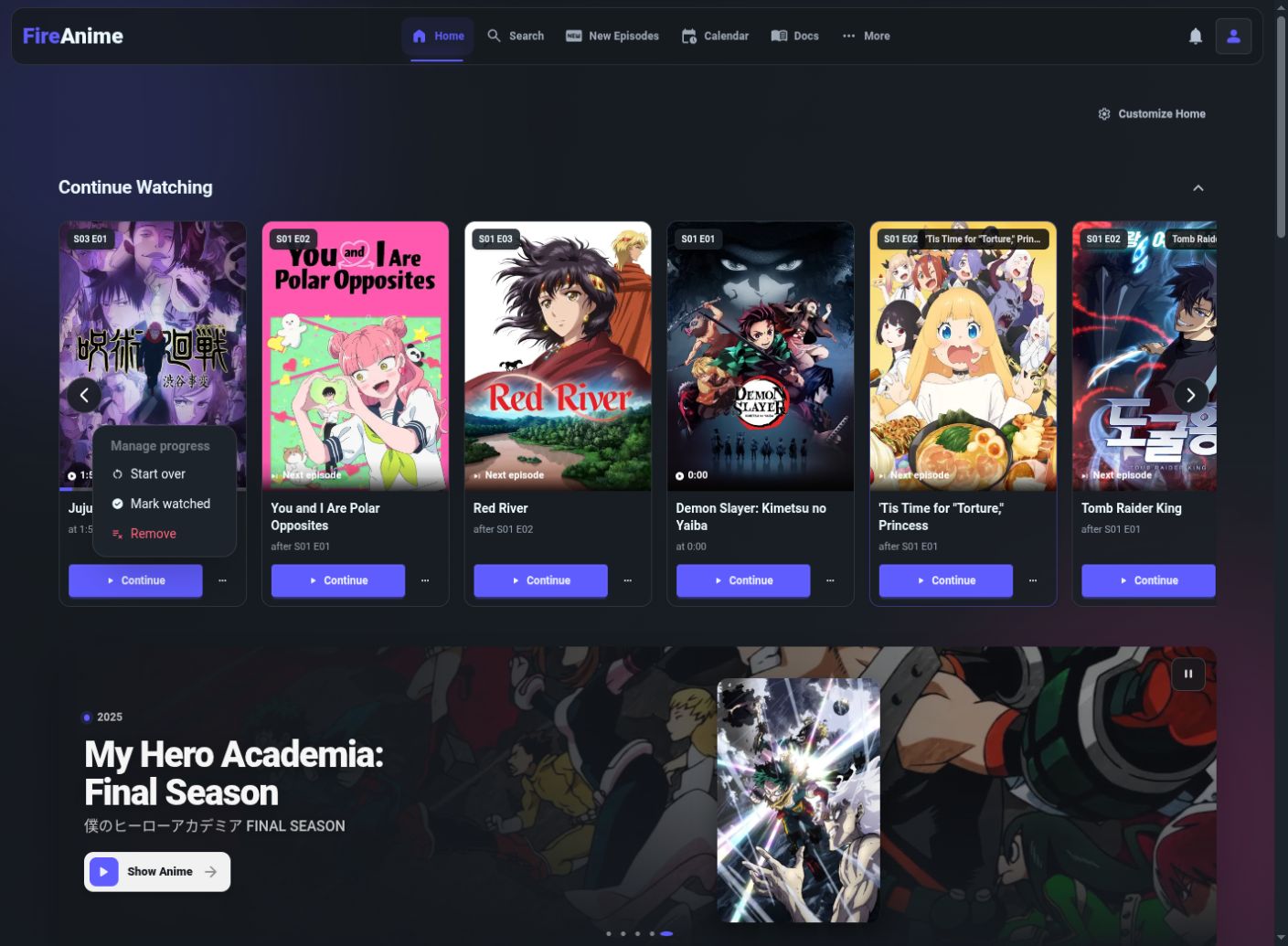
On the website, open the three-dot menu on a Continue Watching card to Start over, Mark watched or Remove its saved episode progress. These actions do not change the anime’s whole-title watchlist status. There is no separate Unwatched toggle on the website’s episode thumbnail; its checkmark is an indicator, not a button.
Covered in this guide: Website in a browser · FireAnime for Android · FireAnime Desktop · FireAnime TV · FireAnime for LG webOS
Choose the right correction
Sign in to the account whose progress you want to change. On Home, Continue Watching suggests either a saved position or a following episode. A guest’s On this device history is a different local view; see guest and account progress.
| You want to… | Use |
|---|---|
| Carry on at the saved position | Continue |
| Replay the episode from the beginning | Start over |
| Tell FireAnime you finished this episode | Mark watched |
| Remove the progress record behind this card | Remove |
| Mark the entire anime planned/completed/dropped | Watchlist status, not this menu |
Start over and Remove change saved episode progress. They are not temporary “hide card” actions.
Correct a website Continue Watching card
- Open Home and find the title under Continue Watching. Read S… E… on the card. at … shows a saved position; after S… E… identifies the completed episode behind a next-episode suggestion.
- Select Continue to watch normally. To make a correction, open the three-dot menu beside Continue, labeled More actions for … plus the anime title.
- Under Manage progress, choose the intended action. An episode in progress offers Start over, Mark watched and Remove. A next-episode card can offer only Remove.
- Wait for the request to finish. Mark watched and Remove refresh the section; Start over opens the original episode after clearing its saved position.
- Check the result against the card’s episode numbers. A next-episode suggestion’s Remove action concerns its preceding saved progress record, not an unwatched next episode and not necessarily every record for the whole anime.
Can I mark an episode unwatched?
The website’s season-thumbnail checkmark is display-only. Clicking the thumbnail opens the episode; there is no separate Unwatched action on it. Do not keep clicking the checkmark or expect the whole-anime Completed status to undo episode completion.
To watch again, open the episode. If a resume prompt appears, choose Start over; otherwise start playback from the beginning or move the timeline to 0:00. Completed episodes may not show a resume prompt. An in-progress Continue Watching card can also offer Start over. To remove a saved account-progress record, use Remove on its Continue Watching card and accept that this deletes that record rather than merely changing a label. If the record is not offered there, the website does not provide a general per-episode Unwatched toggle to substitute.
On an episode page, Episode seen can mark that episode watched. Once it is already marked, the button is disabled; it is not an on/off switch.
Official Android mobile app
- Open Home and find the anime in Continue Watching.
- Tap the card’s three-dot button to open Manage progress.
- Use Start over or Mark episode watched for an in-progress episode. For removal, select Remove from Continue Watching and read the confirmation: it identifies the history entry that will change.
- Confirm only if you mean to remove that progress, then check the refreshed card.
Other official clients can show different progress menus. If the action is absent, use the website account view with the same account instead of clearing the app or deleting a download.
What should happen?
An unfinished episode resumes at its saved time; a completed record can suggest a following episode if one exists. Correcting or removing a record changes the continuation derived from it. Removing one record may reveal another saved entry for the same title.
A resume prompt is not shown for every visit: on the website, positions before one minute or episodes at least 90% complete are not treated as meaningful unfinished resumptions. A new episode suggestion still needs an available catalog episode.
If Continue Watching still looks wrong
- The entire section is missing: check your homepage layout and whether the account has recorded progress.
- You see a source error rather than a usable episode: use playback troubleshooting. A progress entry does not guarantee a working source.
- An old local checkmark remains after removing account progress: the thumbnail indicator and account resume record are separate; do not clear all browser data to make them look identical.
- Another device brings back a position: stop playback there and compare the same account’s progress.
- You linked AniList/MyAnimeList: manual completion can affect outbound tracking; do not mark episodes watched merely to hide a card.
These controls do not delete downloaded video files, remove your account or unsubscribe from releases.